What this is
Framesports publishes an MCP server — a standard address you can hand to an AI assistant so it can read your club’s data. Once it’s connected you can ask your own assistant things like “how did we go against Brothers on Saturday?” or “build me a deck on our lineout” and it will answer from your real sessions. It works with anything that supports MCP. This guide covers Claude, Claude Code and ChatGPT.The assistant sees exactly what you see — every club you’re a member of, and nothing
outside them. If you’re in more than one, tell it which one you mean (“how did
Wests go on Saturday?”) and it will work it out.
Step 1 — Copy your server URL
- In Framesports, click your club name in the bottom-left, then Settings.
- In the settings menu, under AI, click Third-Party AI.
- Click the copy button next to MCP Server URL.
Only club admins can see this page. If you can’t find it, ask whoever set up your
club to send you the URL — it’s the same for everyone in the club.
Claude (claude.ai and the Claude desktop app)
1
Open your connectors
In Claude, click Customize in the sidebar, then Connectors, then Add.Or go straight to claude.ai/customize/connectors.
2
Name it and paste the URL
- Name — type
Framesports. This is just the label you’ll see in the list. - MCP server URL — paste the URL you copied in Step 1.
3
Add it
Leave the authentication settings as they are — Framesports registers itself
automatically — and click Add.
4
Connect and approve
Click Connect. A Framesports pop-up opens over Claude. Sign in if you’re asked to,
then click Allow.
5
Let it read without asking
On the Framesports connector page, set Read-only tools to Always allow.Claude then stops asking before every look at your data. Anything that changes
something still asks first.
6
Try it
Start a new chat and ask:Then ask it to add clip links to the chart — every number becomes a link that
plays exactly those clips in Framesports.
Claude Code
1
Add the server
In your terminal — not inside a Add
claude session — run:--scope user if you want it available in every project, not just this one:2
Check it was added
framesports with ! Needs authentication. That’s expected — the next
step signs you in.3
Sign in
Start a session by running Select framesports from the list, press Enter, and choose
Authenticate. Your browser opens the Framesports consent screen — click Allow.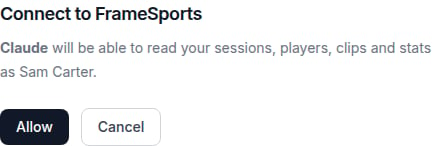
claude, then type:✔ Connected.4
Try it
If the browser doesn’t open, copy the URL printed in the terminal and open it manually.
ChatGPT
1
Turn on Developer mode
Click your name in the bottom-left corner → Settings → Security and login,
and turn on Developer mode.
2
Create the app
Close Settings, click Plugins in the sidebar, then the + button at the top
right.
3
Fill it in
- Name —
Framesports - Server URL — paste the URL you copied in Step 1.
- Authentication — leave it on OAuth.
4
Sign in and approve
Click Sign in with Framesports. A Framesports pop-up opens. Sign in if you’re
asked to, then click Allow.
5
Let it read without asking
On the Framesports page that opens, click Permissions and choose Allow read
actions.
6
Try it
Start a new chat, click + and pick Framesports, then ask:Then ask it to add clip links to the chart — every number becomes a link that
plays exactly those clips in Framesports.
What it can do
A connection belongs to you, not to one club — so if you’re in several, you connect once and can ask about any of them. Once connected, your assistant can:- Read your sessions — results, match stats, who played, how the game moved.
- Read your players — form across sessions, where they rank, their development plan.
- Find clips — every event in your sessions, filtered by player, session or type.
- Build presentations — assemble a clip deck on a theme.
Making changes
Your assistant can also make changes on your behalf (for example archiving a session or building a presentation), but not silently. For anything that archives or deletes something, can’t be undone, costs credits, stops an analysis, or reaches someone outside your club, it stops and shows you a plain-English preview of exactly what it’s about to do, naming the record and saying whether it can be undone, before it does it. Nothing happens until you say yes; if you say no, or don’t answer within ten minutes, nothing changes and the assistant has to ask again. Routine creating and editing (like building a presentation) doesn’t need this extra step.What it can’t do
These are always refused, no matter what you allow:- Anything to do with billing — plans, credits, payments.
- Sign-in and account identity — passwords, who someone is.
- Account access and sharing — inviting people, or making something public.
Managing connected assistants
Club admins can see who has connected an AI assistant on the Third-Party AI settings page, below the server URL: each row shows the assistant, who authorised it, when, and when it was last used. To remove one, open its ⋯ menu and choose Remove access.A connection belongs to the person, not the club, so removing it stops that assistant
for them everywhere, including their other clubs, on its next request. They can
reconnect it at any time.
Troubleshooting
The assistant says it can't see any data
The assistant says it can't see any data
Check the connector actually finished connecting — adding the URL isn’t enough on its
own, you also have to click Connect and approve the Framesports consent screen.In Claude Code,
claude mcp list should say ✔ Connected, not ! Needs authentication.It's answering about the wrong club
It's answering about the wrong club
If you’re in more than one club, name the one you mean in your question — “how did
Wests go on Saturday?” rather than “how did we go on Saturday?”. Ask it to list your
clubs if you’re not sure what they’re called.
ChatGPT connects but never uses it
ChatGPT connects but never uses it
Check Developer mode is on (Settings → Security and login), and that you picked
Framesports from the + menu in that chat.
It's asking me to sign in again
It's asking me to sign in again
The consent screen runs on
app.framesports.ai, so you sign in there even if you’re
already signed in elsewhere. That’s normal, and it only happens when you connect or
reconnect.